Robots Meta Tag vs X-Robots-Tag: A Practical Guide To URL-Level Directive
One misplaced noindex can knock your best page out of Google. One broad robots.txt rule can hide a whole section of your site. And now that Google AI Overviews pull from indexed pages, what crawlers can and can’t see matters even more.
- Some pages should never show up in search, like thank-you pages, staging copies and internal documents.
- Some files, like PDFs, can’t hold a tag at all, so they need a different method.
- A few crawlers, including the ones behind AI answers, follow their own rules.
At Webplanners, our team of SEO consultants checks robots directives in every technical review. Stray tags are one of the most common things we find.
In this blog, we will understand how the robots meta tag and x-robots-tag work, how they differ from robots.txt, and how to control Google, AI Overviews and AI crawlers.
Robots.txt vs Robots Meta Tag vs X-Robots-Tag
| robots.txt | Robots meta tag | X-Robots-Tag | |
|---|---|---|---|
| Where it lives | /robots.txt at the site root | In the page’s HTML head | In the HTTP response header |
| Controls | Crawling | Indexing and snippets | Indexing and snippets |
| Works on | Any URL path | HTML pages only | Any file type (PDFs, images, docs) |
| Scope | Site-wide patterns | One page | One URL, or patterns via server rules |
| Best for | Stopping crawl of whole sections | Noindexing individual pages | Noindexing non-HTML files at scale |
The key difference is simple. robots.txt controls crawling, while the meta robots tag and X-Robots-Tag control indexing. Most robots mistakes come from mixing those two jobs up.
How To Write Each One
Both do the same job in practice, but they’re added in different places, so the syntax looks a little different.
Robots Meta Tag
It goes in the head of the page:
<meta name=”robots” content=”noindex, follow”>
To speak to one crawler only, replace “robots” with its name, for example googlebot.
X-Robots-Tag
This one is sent as an HTTP header, so it’s usually set on the server:
X-Robots-Tag: noindex
Here’s how you’d cover every PDF on Apache using .htaccess:
<FilesMatch “\.pdf$”>
Header set X-Robots-Tag “noindex”
</FilesMatch>
Launch Without Hidden Indexing Mistakes
Every Directive Explained
| Directive | What it does |
|---|---|
| noindex | Keeps the page out of search results |
| nofollow | Asks search engines not to follow links on the page |
| none | Same as noindex, nofollow |
| nosnippet | No text snippet or video preview in results (also limits use in AI Overviews) |
| max-snippet:[n] | Limits snippet length to n characters |
| max-image-preview:[none/standard/large] | Controls image preview size |
| max-video-preview:[n] | Limits video preview length in seconds |
| noimageindex | Stops images on the page being indexed |
| notranslate | No translation offered in results |
| unavailable_after:[date] | Removes the page from results after a set date |
| indexifembedded | Allows indexing of content embedded via iframe despite noindex |
If you only want to hide part of a page from snippets, use the data-nosnippet HTML attribute.
Noindex vs Disallow: The Mistakes We See Most
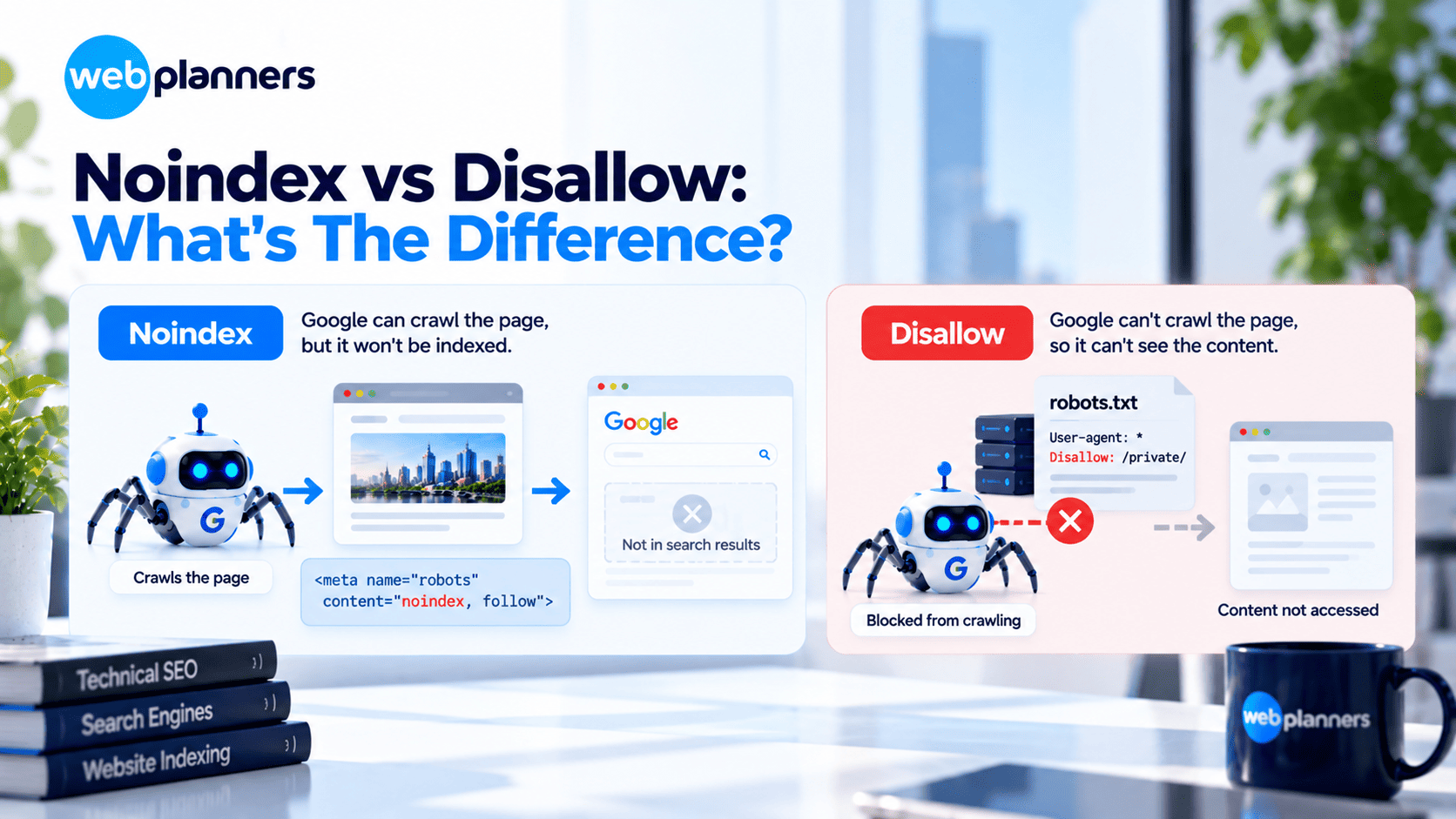
Getting noindex vs disallow wrong is the most common slip, though it’s not the only one.
- Disallowing a page you want removed: If robots.txt blocks a URL, Google can’t read the noindex tag on it. The URL can still appear in results if other sites link to it. To remove a page, allow crawling and add noindex.
- Leaving noindex on after launch: Staging sites often go live with a site-wide noindex still in place. Check for it on every launch.
- Blocking CSS and JavaScript: Google needs both to render pages properly.
- Noindexing paginated or filtered pages carelessly: You can cut off the crawl path to products. Use canonicals and selective rules instead. Online stores get hit hardest here, which is why it’s a big part of our ecommerce SEO work.
- Sending conflicting signals: A noindexed page that’s still in the sitemap, or one canonicalised to a noindexed page, gives Google mixed messages.
Keep Your Best Pages In Google
How To Noindex PDFs And Other Files
PDFs, Word docs and images can’t hold a meta tag. So if you’re wondering how to noindex a pdf, the X-Robots-Tag header is the answer.
It’s a common fix for gated whitepapers, price lists and internal documents that shouldn’t turn up in search. One warning, though. Noindex hides a file from search results, but it doesn’t make it private. Anything truly sensitive needs a login, and a web security review can confirm your files are properly protected.
Controlling AI Crawlers

Most AI crawlers are managed in robots.txt by user agent:
User-agent: GPTBot
Disallow: /private/
User-agent: Google-Extended
Disallow: /
- GPTBot (OpenAI), ClaudeBot (Anthropic) and PerplexityBot can each be allowed or blocked on their own.
- Google-Extended controls whether your content is used for Gemini models. It doesn’t affect Google Search rankings, and it doesn’t remove you from AI Overviews.
- Google AI Overviews draw on pages that Google Search can index and show. To limit how your content appears there, use nosnippet or max-snippet.
- Blocking AI crawlers may reduce your visibility in AI answers.
So decide section by section. Let public marketing content in and restrict anything premium or private. If you want your pages cited in AI Overviews and other AI answers, our AEO and GEO services build on exactly this kind of access.
Get Found In AI Answers
How To Test Your Directives
- URL Inspection in Search Console shows whether Google sees a noindex and whether the page is blocked.
- The robots.txt report in Search Console shows fetch status and errors.
- Browser dev tools (Network tab) reveal any X-Robots-Tag headers.
- A site crawler such as Screaming Frog lists every directive across your site.
FAQs
Should I use noindex or disallow?
Use noindex when you want a page kept out of search results, and use disallow when you want to stop Google crawling low-value sections. Don’t combine them on a page you want removed. If robots.txt blocks the URL, Google can’t read the noindex tag, so the page may stay in results through links from other sites.
What is the difference between a robots meta tag and an X-Robots-Tag?
A robots meta tag sits in the HTML head of a single page. An X-Robots-Tag is sent in the HTTP response header, so it also works on PDFs, images and other files that can’t hold a tag. Both control indexing and snippets, and Google treats them the same way. Pick the one that fits the file type.
How do I noindex a PDF?
Add an X-Robots-Tag: noindex header to the PDF’s server response. On Apache, a FilesMatch rule in .htaccess covers every PDF at once. Don’t block the PDF in robots.txt as well, because Google needs to crawl the file to see the header.
Does blocking Google-Extended remove my site from Google AI Overviews?
No. Google-Extended controls whether your content is used for Gemini models, and it doesn’t affect Google Search rankings or AI Overviews. AI Overviews draw on pages that Google Search can index and show. To limit how your text appears there, use nosnippet or max-snippet on the page.
Can I block AI crawlers like GPTBot and ClaudeBot?
Yes. Both follow robots.txt, so you can allow or block each one by user agent. Blocking protects your content from AI use, but it can also keep your brand out of AI answers. Many businesses allow public pages and block only premium or private sections.
Our Recent Blogs

Couldn't be happier with how things have gone since working with Webplanners. The team genuinely cares about getting results and has helped us stay ahead of the competition. Thanks for all the hard work, legends!
Webplanners has been a huge part of our digital growth. Managing multiple websites isn't easy, but they've made the whole process feel effortless. The results have exceeded our expectations.
The team has been great to work with and always keeps us in the loop. We've seen steady improvements over time and the whole process has been straightforward. Very happy with how things are going.